What is an AI integration platform?
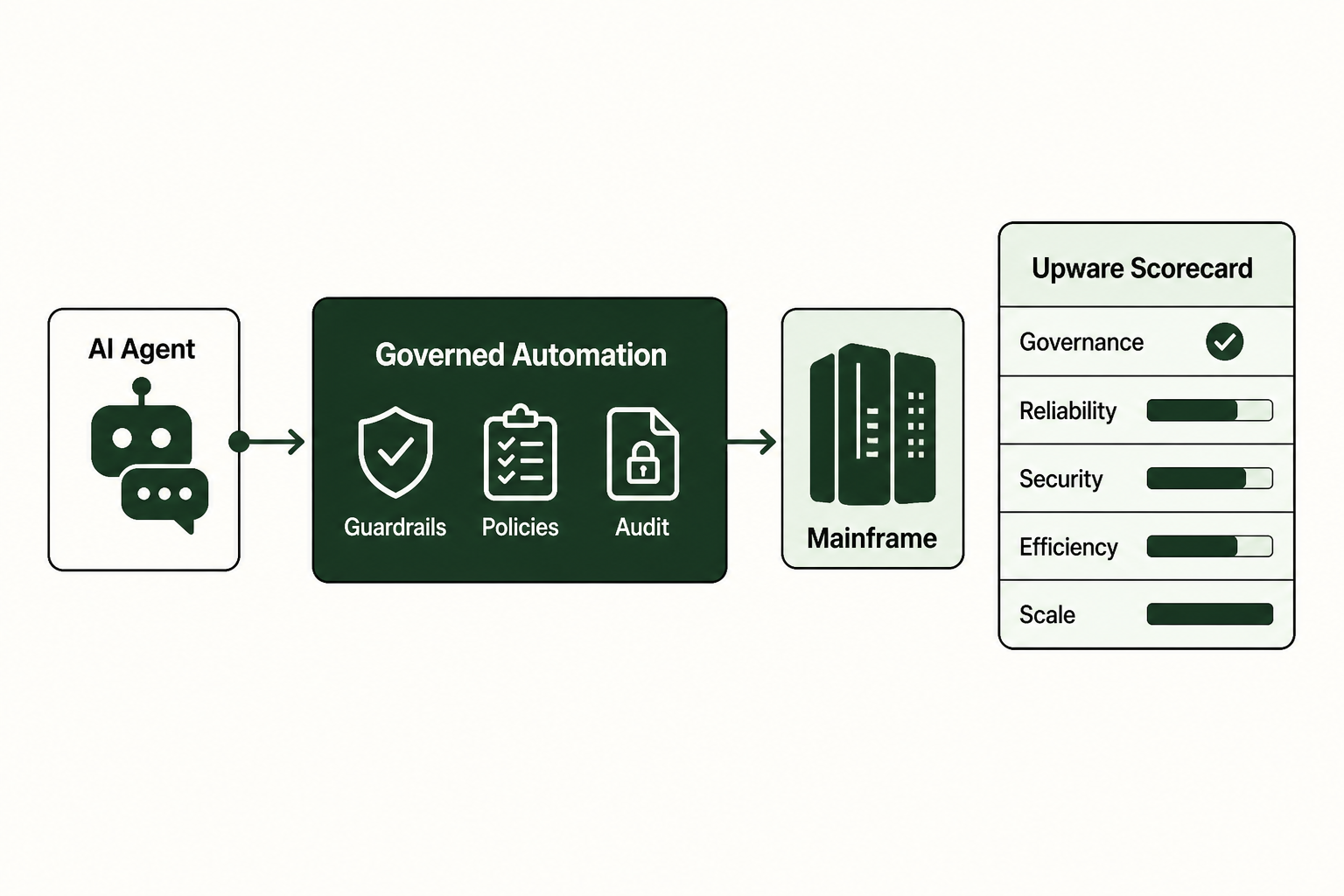
The stalled pilot usually breaks at the same point: the agent can reason over a request, but it cannot safely touch the systems where the work actually happens. An AI integration platform gives AI agents a secure gateway into enterprise systems, including legacy applications, with controlled and efficient access that does not turn every connection into a custom engineering project.
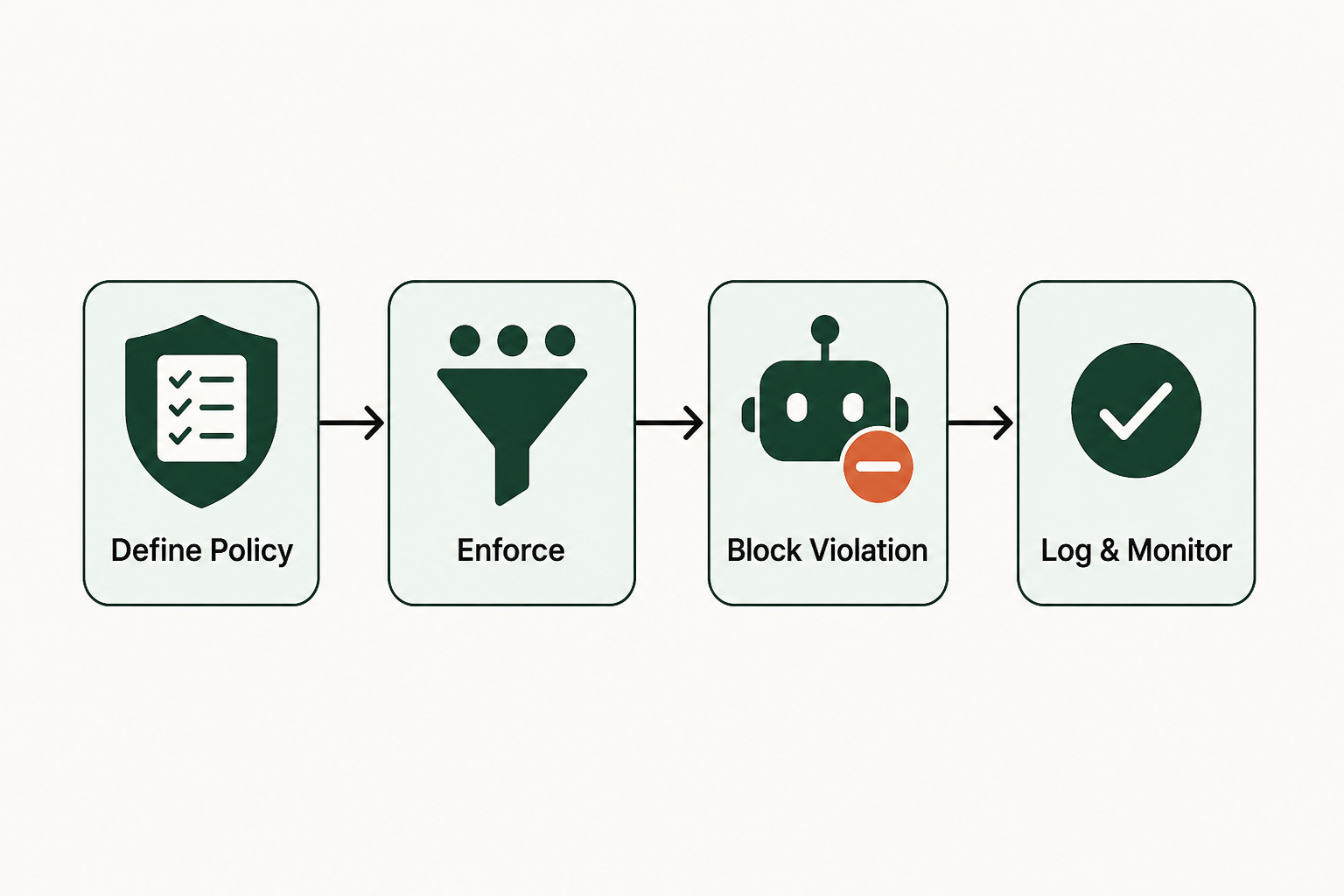
Think of the agent as the brain and the connection layer as the hands. The platform does not hand the agent unrestricted access to the ERP, CRM, admin portal, or no-API systems. It gives the agent a governed path to request a defined action, checks that request against controls, then executes through approved system paths and records what happened.
That distinction matters because AI-powered data integration tools already use algorithms and predictive analytics to automate parts of integration work. In enterprise systems, though, automation is incomplete without identity, auditability, resilience, and control. The World Economic Forum describes a scalable enterprise intelligence platform as crucial for deploying AI consistently, securely, and at scale, coordinating data, models, decisions, and automation with robust data management, identity controls, auditability, and resilience.weforum.org/docs/WEF_The_AI_Playbook_for_Financial_Services_2026.pdf).
The practical goal is not to wire an agent directly into production and hope the prompts hold. It is to connect the agent through governed execution, so every action has defined authority and a controlled system path, with a record that operations, security, and process owners can review.
Prerequisites: what you need to start
Before configuration begins, get the ownership model straight. The setup work is manageable, but it has to be precise because security and process control belong inside the integration path, not off to the side as documentation.
Before you configure anything, assemble these inputs:
- System access boundaries for each target application, including which accounts, roles, screens, transactions, or endpoints the agent may use.
- Workflow ownership from the business team that owns the process, because a connected agent changes how work is performed, not only how data moves.
- A test environment or controlled sandbox where the agent can execute representative actions without touching live records.
- Authentication details that match your enterprise policy, including service accounts, single sign-on rules, or credential vault requirements.
- Audit requirements that define what must be logged, who reviews exceptions, and how long records are retained.
- A named fallback owner for cases where the agent cannot complete the task or a control blocks execution.
You do not need to rewrite the legacy system first. A better starting point is narrower: pick one workflow whose inputs and allowed actions are clear, with an outcome that a process owner can verify.
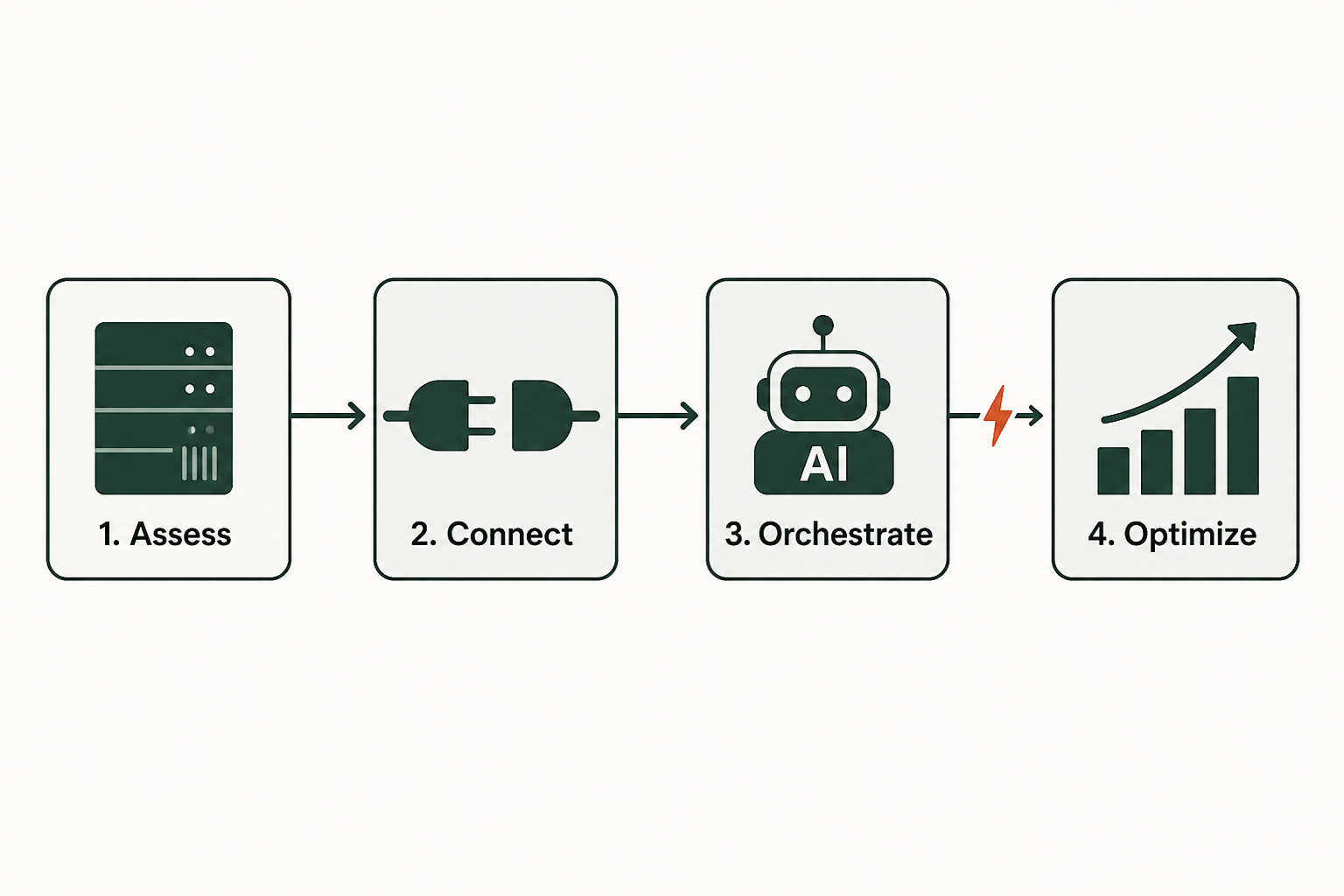
Step 1: map your target systems and workflows
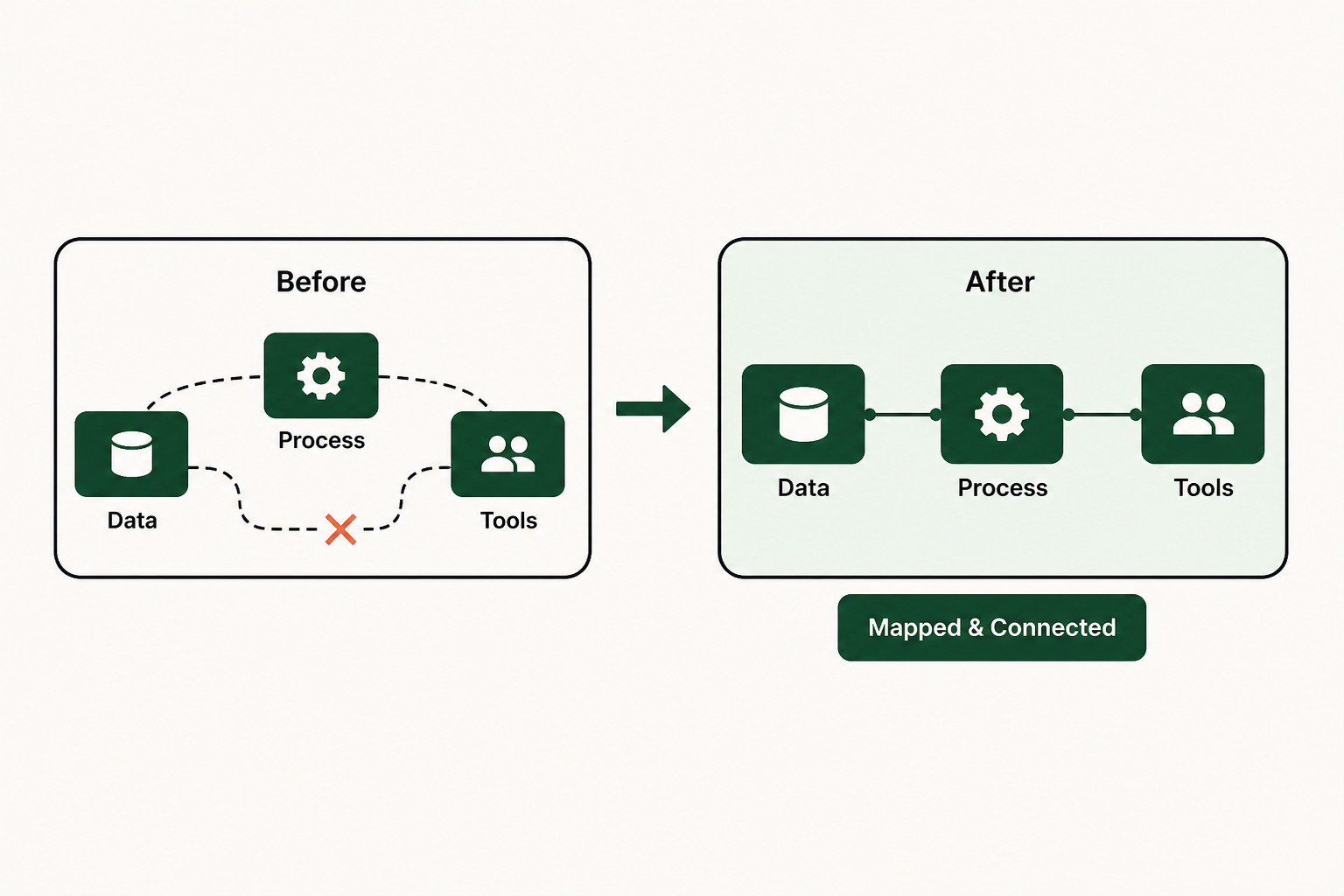
Once the prerequisites are in place, start with the work itself. An AI agent should never discover its permissions while it is acting, so the workflow has to define the boundary before the connection goes live. You want deterministic workflows before you want more autonomy, because predictable execution lets security and business owners work with operations on how the connection should behave.
Select one process where the agent needs to read from or act inside more than one system. Good candidates are tasks where employees already switch between enterprise systems while they copy data, validate status, or update a record. Avoid processes where the correct action depends on unresolved policy judgment, unless a human approval step is built into the flow.
Document the workflow in operational terms:
Workflow: resolve a service request
Input: customer identifier and request type
Systems: CRM, legacy ERP, internal admin portal
Allowed actions: read account status, check open orders, update case note
Blocked actions: issue refund, change billing terms, close account
Fallback: route to service operations queue
Then turn that map into a control matrix:
- Inputs the agent may accept so prompt content does not become system authority.
- Systems the agent may touch so no-API systems and legacy systems are included without broad access.
- Actions the agent may request so deterministic workflows govern the execution path.
- Human checkpoints where policy, financial exposure, or customer impact requires review.
 Step 1: map your target systems and workflows
A useful map is not a diagram for a slide. It is the contract linking the agent and the execution layer with the systems that hold production data.
Step 2: configure the Agentic Harness for governed execution
After the workflow is mapped, build the controlled connection. The Agentic Harness is the operating layer between the agent and enterprise systems. In plain language, it receives the agent's intent and checks whether the requested action is allowed, then executes through approved paths and records the result.
That is where AI agent governance becomes system behavior rather than policy language. Governance should not depend on the agent remembering the rules. The Agentic Harness should enforce them before anything changes in a downstream application.
Configure the first workflow around four control points:
- Identity and authorization so the agent acts through approved enterprise credentials, not personal accounts or unmanaged scripts.
- Action limits so the platform can distinguish a permitted status lookup from a blocked account change.
- System-specific connectors or interaction paths so legacy systems and no-API systems, including homegrown portals, can be reached without turning each connection into a custom project.
- Exception handling so failed authentication, missing data, or a blocked action routes to a named owner instead of retrying blindly.
A research analysis of an AI-enabled integration platform found that automating manual processes can [reduce errors and mistakes](https://tei.forrester.com/go/celigo/integrationplatform?A research analysis of an AI-enabled integration platform as of 2022 found that automating manual processes can reduce errors and mistakes, especially in repetitive work where human attention degrades over time. That is the practical reason to use governed execution: the agent is not improvising inside enterprise systems, and employees are not rekeying the same data across tools.
Keep the first configuration narrow enough to test, but complete enough to include real controls. If the workflow cannot show who acted, what was requested, what was allowed, and what changed, the connection is not ready.
Step 3: define and test the execution layer
With the Agentic Harness configured, define the rules of engagement for runtime behavior. The execution layer is where agent intent becomes system action, so it has to remain predictable under pressure. Upware centers this layer around governed execution, with deterministic workflows that make runtime behavior controlled rather than improvised.
Conversational agent platforms and agent engineering frameworks are useful for building and coordinating agents. They leave a harder operational problem unresolved when the agent needs to change records inside regulated enterprise workflows or systems with limited interfaces, including legacy systems and no-API systems. Upware centers on the governed execution layer between agents and enterprise systems instead, so the agent can request work while the platform controls how that work is performed.
Define each allowed action as a small, testable unit:
Action: update service case note
Allowed trigger: verified customer request
Required context: customer ID, case ID, note category
System path: CRM case record
Approval needed: no
Audit event: request, authorization result, system update, response
Then test with three classes of request. First, use a valid request that should pass and update the test record. Second, use an incomplete request that should stop because required context is missing. Third, use a prohibited request that should be blocked even if the agent asks confidently.
Upware's platform offers 100% predictability in runtime and requires 0 engineering resources for this governed execution model. That does not remove the need for process design or access approval, but it changes the burden of integration: the work shifts to configuration and control definition, followed by verification rather than a custom build for every system.
Your test is successful when the agent can complete the allowed task and reject the blocked task while producing enough evidence for creating an audit trail. The audit record should show the request, the control decision, the system interaction, and the final state.
Troubleshooting common integration issues
Even a well-mapped workflow can fail in testing. That is useful if the failure tells you whether the agent asked for the wrong thing or the execution layer correctly refused to do something unsafe. Treat both cases as signals before you loosen controls.
Use this checklist when a test does not behave as expected:
- Authentication fails before the workflow starts because the service account, role, credential vault, or session policy does not match the system path. Verify that the same credential can perform the action manually in the controlled environment.
- The agent requests a blocked action because the prompt or tool description is too broad. Tighten the allowed action list and make the blocked action explicit in the workflow definition.
- The workflow stops on missing context because the agent has not collected a required identifier, field, or approval. This is a good failure if the audit record shows which requirement was missing.
- The system accepts the action but the outcome is wrong because the mapped workflow points to the wrong record, screen, field, or transaction. Fix the workflow map before changing the agent.
- The audit record is incomplete because the test did not capture the full chain from request to execution result. Expand logging before production use.
 Troubleshooting common integration issues
A controlled failure is better than an untraceable success. If the Agentic Harness blocks an action and routes an exception while recording the reason, governed execution is working as designed. If the agent can act without a clear authorization decision, the connection is too open.
The cleanest verification checks that the allowed task completes and the prohibited task fails, then confirms that the business owner can read the audit record without guessing what happened. That is also how you separate a reliable AI integration platform from a demo that only works under ideal conditions.
From connection to scale: your next steps
A tested integration is done only when the agent can complete one approved workflow through a controlled path, with access limits and deterministic workflows, plus exception handling and an audit record that stands up to review. Anything short of that is still a pilot, even if the demo looks smooth.
From there, expand by workflow, not by system count. Add the next process only when the first one has stable controls and a named owner. This keeps the integration program cost-disciplined and prevents the platform from becoming another uncontrolled automation layer.
A Statista timeline reported in 2025 that many businesses expected workflow automations to span the organization and access functions from third-party systems within four or more years.com/statistics/1602869/timeline-of-ai-agent-integration-in-business). Treat that as a direction of travel, not a reason to rush. The better move is to scale governed execution one workflow at a time.
Upware offers deployment in days for this model, but the durable value comes from the control design. Agents can think, while the Agentic Harness handles the hands-on work across enterprise systems.
Start your AI integration journey. Implement now.
Discover the full capabilities of an AI integration platform.
See how our solution integrates AI agents with your existing systems securely and efficiently.
Frequently asked questions
What is the main benefit of using an ai integration platform?
The main benefit is controlled execution across systems that were not designed for AI agents. Instead of giving an agent broad access or asking engineers to build every connection from scratch, the platform creates a governed path for approved actions. That can reduce manual process errors in repetitive work and gives enterprise teams a more secure way to coordinate data, identity, automation, and auditability.
How is this different from older integration and orchestration platforms?
Older tools often focus on moving data, calling APIs, or coordinating predefined automations. An ai integration platform for agents has to manage a different problem: an agent can request an action in natural language, but the enterprise still needs strict control over what happens in production systems. The difference is the execution layer, where intent is checked, constrained, performed, and logged.
How long does it take to see results from this type of integration?
For the provided solution, deployment is measured in days, assuming the target workflow, access rules, and process owner are already defined. That does not mean there is no setup. The fastest path is a narrow first workflow with clear allowed actions, a controlled test environment, and audit requirements agreed before configuration starts.
Can I connect an AI agent to a system that does not have an API?
Yes, that is one of the core reasons to use this approach. Many legacy systems, homegrown portals, and no-API systems still run critical enterprise work. The point is to connect the agent through a governed execution path that respects existing system logic and access controls, rather than replacing the system or forcing a custom integration project for every workflow.